SERVING ANAHEIM, CA & SURROUNDING AREAS
 CALL TODAY

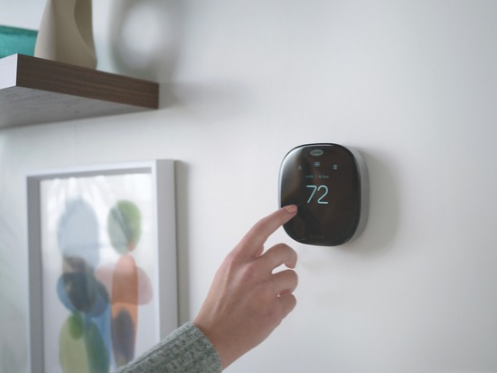
Updating Your Smart Thermostat Settings for Fall in Anaheim
As summer transitions to fall in Anaheim, changes in your routine can impact your home’s comfort and energy use. Days get shorter, evenings become cooler, and household schedules shift. This is the perfect time to review your summer HVAC automations. Routines that kept your home cool during long, hot days may now lead to wasted energy and a less-than-ideal indoor environment.
Changing sun exposure and new daily routines can make your smart thermostat settings outdated. A quick review of your automations helps your HVAC system adapt to the new season. A few minutes to adjust these settings can make a big difference in how your system performs throughout fall and winter.
Why Update Your HVAC Automations in the Fall?
The “set it and forget it” approach to smart thermostats works well, but only if your lifestyle remains consistent. Fall brings significant changes that can throw off your summer settings. Your family’s schedule likely changes from relaxed summer days to structured school and work routines, altering when your home is occupied.
In Anaheim, the sun’s position shifts, changing how much solar heat your home gains. Cooler evenings also mean your air conditioner doesn’t need to run as aggressively as it did in July. The goal is to align your system’s operation with your current comfort needs and occupancy patterns, not just the calendar.
Revisit Your Smart Thermostat Schedule
Your smart thermostat’s schedule is the foundation of its efficiency. The wake, sleep, home, and away settings that worked for summer may no longer match your fall lifestyle. Now is the time to review and adjust these core temperature schedules to reflect your current daily routines.
Go through your settings and remove outdated summer schedules, like vacation modes or settings for when kids were home from school. Smart thermostats are powerful because they automate temperature changes seamlessly. By updating these schedules, your HVAC system will heat or cool your home only when necessary. This prevents energy waste while still keeping your home comfortable.
Adjust for Cooler Evenings and Mild Anaheim Weather
Anaheim and the greater Orange County area enjoy a mild fall, but day-to-night temperature swings become more noticeable. Warm, sunny afternoons can quickly give way to cool evenings and mornings. Instead of making aggressive seasonal changes to your thermostat, make small adjustments to your heating and cooling setpoints.
Many smart thermostats feature an “Auto” mode that can switch between heating and cooling. While convenient, use this setting carefully during transitional seasons. If your heating and cooling setpoints are too close, your system may cycle frequently and switch back and forth unnecessarily. Reviewing your setpoints helps your system respond appropriately to the distinct temperature shifts of a Southern California fall.
Review Sunset-Based Smart Home Routines
If you use smart home platforms like Google Home or Amazon Alexa, you might have automations tied to sunset or sunrise. For example, a routine might close your smart shades and lower the thermostat temperature at sunset. As the days get shorter, these sunset-based triggers will activate earlier.
Take a look at any routines connected to your thermostat, fans, or smart shades. An automation that worked for an 8 PM summer sunset might now trigger at 6:30 PM. This could make your home cooler than you’d like in the early evening. Make sure your HVAC automations still match your comfort needs and don’t create unintended temperature changes.
Update Geofencing and Occupancy Settings
Geofencing is a feature that uses your smartphone’s location to automatically adjust your HVAC settings. When the last person leaves the designated area around your home, the system can switch to an energy-saving “Away” mode. When the first person returns, it can resume the normal “Home” schedule.
If your work, school, or travel schedules have changed since the summer, your geofencing settings may need an update. Also check your occupancy sensors or geofencing rules. Make sure they aren’t overriding your preferred thermostat schedule in a way that causes discomfort or wastes energy.
Check for Conflicting Smart Home Automations
In a modern smart home, several different apps and devices can control your HVAC system. Your thermostat’s native app, a voice assistant, and other smart home platforms might all have permission to adjust the temperature. This can lead to overlapping schedules or competing commands that make your HVAC system behave unpredictably.
To avoid confusion, review which platforms have control over your thermostat. It’s often best to set your primary schedule in one place, like your main thermostat app, and use other platforms for temporary adjustments. Keeping your automations simple and predictable is the key to a smoothly running smart comfort system.
Use Smart Monitoring to Track HVAC Performance
Most smart thermostats provide valuable data about your HVAC system’s performance. You can often view runtime reports, temperature history, and humidity readings. These tools can help you see if your scheduling adjustments are effectively reducing energy use.
Features like real-time system monitoring can also provide alerts for potential issues. If you’ve updated your schedule for efficiency but notice an increase in your system’s runtime, it might not be a scheduling problem. This could indicate an underlying HVAC issue that needs professional attention.
Review Vacation and Away Modes
Fall often includes travel for holidays or long weekends. Before you head out of town, check your thermostat’s vacation or away mode settings. Confirm that the temperature setpoints still match your preferences for energy savings and home protection while you’re gone.
One of the best features of a smart thermostat is the ability to make adjustments remotely from your phone. If your travel plans change, you can adjust the settings with just a few taps in the app.
Pair Smart Home Updates With Fall HVAC Maintenance
Smart home automations are only as effective as the equipment they control. For your thermostat schedules and routines to deliver optimal comfort and efficiency, your HVAC system must operate properly. The fall is the perfect time to pair your smart home review with professional HVAC service.
A seasonal tune-up prepares your system for the cooler months ahead. During a heating maintenance visit, our NATE-certified technicians can check thermostat accuracy, inspect for proper airflow, and test system performance. If you’re experiencing comfort issues, we can help determine whether the cause is related to your automation settings, the thermostat itself, or your HVAC equipment.
Get Your Anaheim Smart HVAC System Ready for Fall
As your routines change with the season, take a moment to confirm your smart thermostat settings are keeping pace. Review your schedules, automations, and system settings to keep your Anaheim home comfortable and energy-efficient all season long. A well-tuned smart home system works seamlessly in the background, adapting to your life and the local climate.
At Associated Heating & Air, our family-owned company has been serving Anaheim and Orange County since 1990. Our experienced, NATE-certified team is here to help with all your smart thermostat, heating, and cooling needs. From fine-tuning your automations to providing comprehensive HVAC maintenance, we’re committed to keeping your home comfortable year-round.
For expert help with smart thermostat services or fall HVAC maintenance in Anaheim, CA, contact Associated Heating & Air to schedule an appointment today.